 Vblink777
Guide
How to log in to Vblink777
Published September 15, 2026 · Updated September 15, 2026
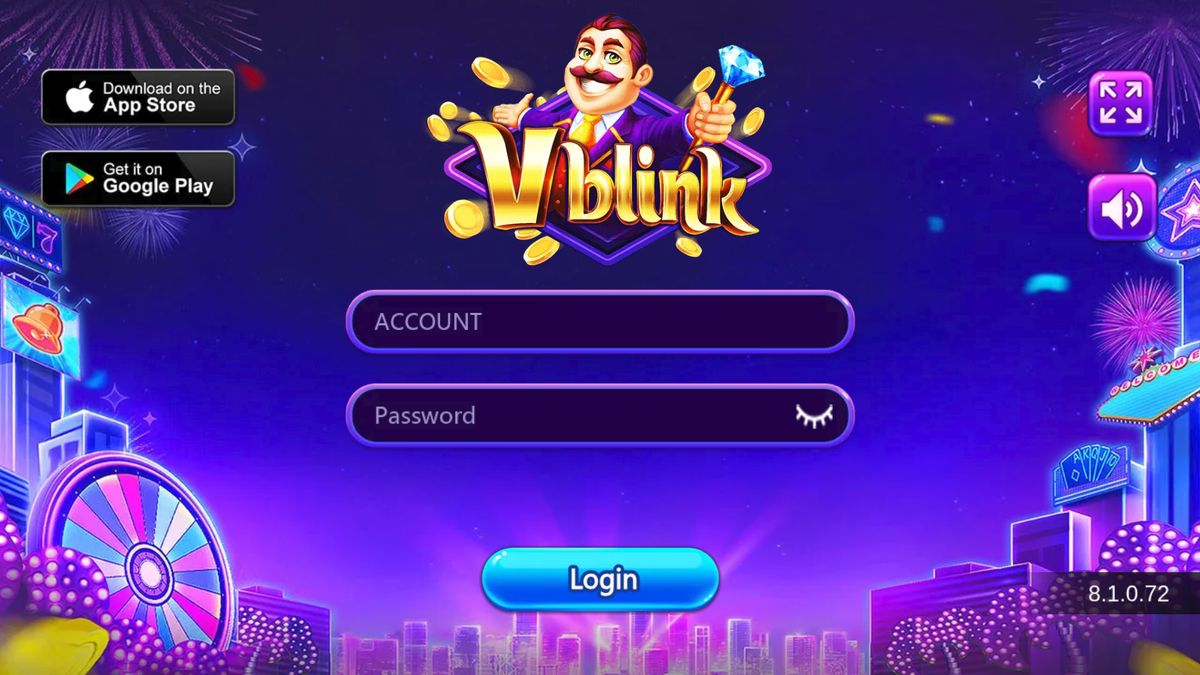
People who type vblink777 login usually want one URL, one canvas, and a warning about fakes. The client we opened is a browser sign-in. It is not a form on vblink777login.com.
Checked 15 September 2026 against the public page at vblink777.
Official URL
Use https://game.max876.com/theme3/channel_luck_seo/. If the host is anything else — vblink.net, vblinkapp.com, a “create account / $20 bonus” landing, or an APK blog — you are not on the client this guide describes.
This notes site never collects Account or Password. The Login buttons open vblink777 in a new tab with a tracking tag so we can see which page sent you.
What the canvas looks like
| Item | What we saw | What that means |
|---|---|---|
| Address | https://game.max876.com/theme3/channel_luck_seo/ |
HTTPS only. |
| HTML title | Vblink |
No marketing snippet in the static source. |
| Fields | Account, Password | Landscape HTML5 canvas (Cocos), not a store page. |
| Button | Login | No Register and no Forgot Password on the public page. |
| Build | 8.1.0.72 |
Lower-right. Builds change; trust the stamp on your screen. |
| Badges | App Store / Google Play art | Artwork is not a live listing. |
If your screen does not match the screenshot on the homepage, stop. Compare it with the login problems checklist.
Step by step
- Confirm you are 21+ and that this kind of play is legal where you live. Run what to check before you register if you have not already.
- Open a current Chrome, Safari, or Edge window. Do not start inside a random APK installer.
- Go to
https://game.max876.com/theme3/channel_luck_seo/. Wait out the loading bar. Rotate to landscape if the client asks. - Check the lower-right build stamp and the Account / Password / Login layout.
- Type the account the operator (or the agent who set you up) issued. Type the password. Tap Login.
- If this is the first time you have used a password someone else created, change it after you are in — the person who issued it may still know the original.
Optional: pin the page to your home screen so the next vblink777 login skips the browser chrome. Device steps live in how to install the Vblink web app.
Accounts, passwords, and resets
We did not see a self-serve registration control. Public operator FAQ language and Google’s AI overview for this query both say a store or agent creates the Mobile ID / account and hands you the password.
What follows from that, for a reader:
- This site cannot open an account for you.
- The public canvas had no “Forgot Password” link. If you cannot sign in, contact the same party that issued the credentials. We cannot reset them.
- Do not send government IDs, passwords, or card numbers to hello@vblink777login.com. That inbox is for corrections to these pages.
Lookalikes
A Google US search for vblink777 login on 15 September 2026 also returned:
- Play Store titles styled “V-blink: 777 Casino Slots,” described as entertainment with no real-money prizes.
- APK mirrors and “VBLink777 — Create Account” pages on other domains.
- Guides that named a different host as the login.
Those results are why a notes page has to show the real canvas. A high store score is not vblink777.
Sources / How we checked
Checked 15 September 2026.
- Public GET of
https://game.max876.com/theme3/channel_luck_seo/in a desktop browser: Cocos HTML5 canvas, titleVblink, login fields, build8.1.0.72. - Google US results for
vblink777 loginand"vblink777 login": official URL plus Play Store lookalikes, APK pages, and affiliate hosts. - We did not log in, so we did not capture the post-login lobby, cashier, or in-app terms.
FAQ
What is the official Vblink777 login page?
https://game.max876.com/theme3/channel_luck_seo/ is the client we loaded on 15 September 2026. HTML title Vblink, Account and Password fields, Login, build 8.1.0.72.
Can I log in on vblink777login.com?
No. This domain is notes and referral links. Typing a password here would be the wrong place. Use the Open Vblink777 Login buttons, which go to vblink777.
Why is there no Register button?
The public canvas we loaded had Account, Password, and Login only. Operator FAQ copy describes accounts issued by a store or agent. This site does not create accounts.
What if Login does nothing?
Confirm the URL, the canvas, and that Caps Lock is off. Then read the login problems guide. Wrong-host APKs and Play Store lookalikes never show this canvas.